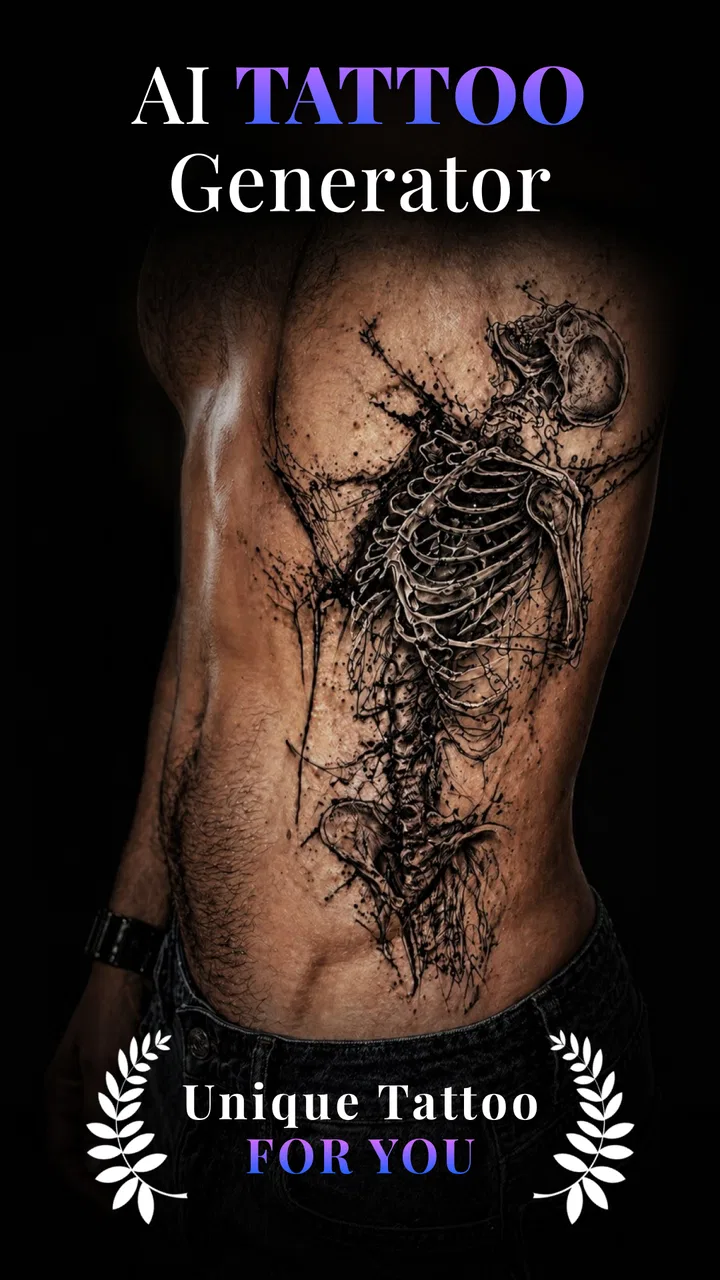
AI Tattoo Design: ArtReel
- 4.5
- Rating
- 100.00K
- Installs
- Free
- Price
 Analysis by App-foxy
I approached AI Tattoo Design: ArtReel as a sketching companion rather than a replacement for a tattoo artist. It is an art and design app from Smart AI DEV that turns a rough idea into a starting point for custom ink concepts. That distinction matters: the useful result is not necessarily a tattoo-ready stencil, but a visual direction you can discuss, edit, and refine.
My first impression is that the app is aimed at people who have an image in mind but do not know how to express it clearly. You can begin with a theme, mood, subject, or placement idea and use the generated artwork to narrow down what you actually want. For anyone browsing tattoo references and finding that none quite fit, this is a more personal way to explore.
How the app feels during real creative work
I find the most useful way to judge a tattoo concept is to separate the image I enjoy looking at from the idea I would actually want to live with. In a focused ArtReel session, I would keep notes on what each promising result gets right—shape, mood, or simplicity—so the next decision is more deliberate than simply chasing another striking preview. That distinction leads naturally to the practical question of how to handle a design once the creative session ends.
You May Also Like

 Blood Strike: 2.5 Anniversary
Blood Strike’s Loadouts Turn Every Drop Into a Tactical Gamble
A close look at Blood Strike’s custom loadouts: how fast access to signature weapons reshapes its battle royale rhythm, rewards preparation, and narrows the gap between fights.

 Pandora - Music & Podcasts
Pandora’s Music Is Easy to Start, but Harder to Recover
Pandora’s strength is its low-effort path from a seed to a station. Its weak spot is how much confidence it asks you to place in connection, setup, and quiet recovery.

 8 Ball Pool
8 Ball Pool Is Built on Rivalries, Rematches, and Routine
A close look at the rivalries, rematches, shared routines, and unanswered safety questions that turn a quick pool match into a persistent mobile community.

 Samsung Music
Samsung Music’s Quiet Strength Is Playing What You Already Own
Its reach comes less from spectacle than from dependable access to a personal library. That simplicity is both the app’s strongest retention engine and its ceiling.

 AccuWeather: Weather Radar
AccuWeather Review: A Quick, Clear Forecast for Everyday Decisions
For everyday plans, the best forecast is the one you can understand quickly. AccuWeather makes rain timing, radar, and local conditions easy to act on, with a few trade-offs.

 Hill Climb Racing
Why Hill Climb Racing Still Turns Crashes Into One More Run
A tiny car, a bumpy hill and one more upgrade: Hill Climb Racing keeps resurfacing because its simple chaos makes every near-miss feel personal.
More From Our News Desk



Speed expectations when an idea is still forming
The strongest part of this kind of tool is the early brainstorming stage. Instead of opening a drawing program and facing a blank canvas, I can start with a concept such as a botanical symbol, an animal, a geometric emblem, or a darker illustrative style. The app’s role is to give that thought a visible shape quickly enough to keep the creative momentum going.
That speed should be understood as idea speed, not professional production speed. An AI-generated concept can help me compare directions, but it still needs human judgment. A design that looks attractive on a screen may have awkward line density, poor balance, or details that will not age well on skin. I would use the app to make decisions faster, not to skip the design review that comes before a permanent tattoo.
A practical workflow is to begin broad, then change only one part of the request at a time. If I alter the subject, style, composition, and mood together, it becomes difficult to understand why a result improved or became less useful. Keeping the concept stable while refining one element makes the generated variations easier to compare.
The most valuable output is often the conversation starter. A strong concept gives a tattoo artist something concrete to interpret. Even a result I would not use directly can reveal that I prefer thinner visual detail, a simpler silhouette, or a different balance between dark and open areas.
What happens during heavier creative sessions
Short sessions are the natural fit. I can imagine using it while collecting ideas for a first tattoo, preparing for a consultation, or testing several symbols for a meaningful design. Longer sessions become more demanding because creative comparison encourages repeated generation, saving, and switching between possibilities. The more options I create, the more important it becomes to organize them outside the moment rather than treating every attractive image as a final candidate.
For that reason, I would divide a large project into stages. First, explore the subject. Next, settle on a visual language. Then, compare placement-friendly compositions. Finally, show the shortlist to a professional. This avoids wasting time polishing concepts that were never suitable for the body area in question.
There is also a subtle trade-off in AI-assisted design: abundance can slow decision-making. A traditional reference search may produce too few relevant ideas, while an AI tool can produce enough possibilities to make choosing harder. I found the best discipline is to define a small checklist before generating anything: subject, approximate size, preferred level of detail, and whether the design should read clearly from a distance.
That checklist is especially useful when the design has personal meaning. It keeps the session focused on the tattoo I want rather than on whichever image happens to look most dramatic in a single preview.
Stability and the importance of a recovery habit
For a creative app, reliability is not only about whether it opens. It is also about whether the workflow remains understandable when a result is disappointing, a concept needs revision, or I return to the project later. I prefer treating each promising idea as a draft and recording the wording that produced it. That gives me a way to rebuild the direction instead of relying on memory.
I would also avoid assuming that the first attractive result is safely preserved forever. When working on an important tattoo concept, I would keep personal copies of the images I want to discuss and note the changes I made between versions. This is a sensible recovery habit for any visual project, particularly when the design may be shown to someone else for professional refinement.
The app is easier to trust when I use it as an exploratory layer in a wider process. I would not make a permanent decision from one generated image, and I would not treat a temporary creative session as the only record of an important design. That is not a criticism unique to this app; it is a necessary boundary when an idea moves from a screen to skin.
Device constraints and everyday practicality
AI image work is more comfortable on a reasonably modern phone or tablet than on an older device struggling with limited space or background activity. The listed minimum is Android 6.0, which makes the compatibility range broad, but compatibility alone does not tell me how pleasant extended visual work will feel on every handset. Screen size, available storage, and general device condition still affect the experience of reviewing details.
A smaller display is fine for brainstorming, but it makes subtle linework harder to judge. If I were comparing two designs with delicate shapes or dense shading, I would move to a larger screen before making a decision. The phone is convenient for collecting ideas; it is not always the best place to inspect whether a composition is genuinely clear.
Resource demands are also worth considering in practical terms. Repeated visual generation can be more tiring for a device than reading text or browsing a simple gallery. I would use the app with other intensive tasks closed when possible, especially during a focused design session, and I would avoid judging a concept while the device is already hot, low on storage, or heavily occupied by background work.
Because the app is free to install, it is easy to test without making an immediate purchase decision. However, the presence of in-app purchases ranging from $4.99 to $79.99 per item means I would explore the basic workflow first and decide what level of use is genuinely worthwhile. The upper end is significant enough that casual experimentation should not turn into an accidental commitment.
Where it fits among familiar alternatives
The usual alternatives each solve a different part of the tattoo process. Reference galleries are excellent for discovering established styles and seeing how designs look in real-world contexts, but they often lead to imitation rather than a personal concept. Manual drawing apps give precise control, yet they ask the user to already understand composition, layers, and visual construction. A consultation with a tattoo artist remains the strongest route for anatomy, placement, line behavior, and long-term practicality.
ArtReel sits between those options. It is more personal than scrolling through references and faster for initial ideation than drawing everything from scratch. It is less authoritative than a professional consultation and less controllable than a dedicated illustration application. I see its advantage in reducing the distance between “I have an idea” and “I can show someone what I mean.”
That makes it particularly useful for people who are not confident artists. Someone may know they want a quiet, symbolic, black-and-grey concept but have no ability to sketch it. A generated visual can communicate the emotional direction even when the final tattoo must be redesigned by hand.
A realistic everyday scenario
Imagine I am planning a small forearm tattoo connected to travel. I might start with a compass, then realize that a literal compass feels too common. I can use the app to explore combinations involving a map contour, a personal landmark, and a restrained illustrative treatment. After reviewing the results, I may discover that the most important element is not the map at all, but a simple directional shape with open space around it.
At that point, I would select a few distinct directions rather than presenting a large pile of images to an artist. I would explain what I like in each one, identify details that feel too crowded, and ask the artist to redraw the concept for the intended size and placement. The app has done its job if it helped me articulate the idea more clearly and arrive at the consultation with better questions.
Three details that improve the workflow
First, I would design for the body area from the beginning instead of generating a beautiful image and trying to force it into an unsuitable space later. A long vertical concept, a compact emblem, and a wide composition behave differently. Even when the app gives me the visual direction, I need to think about the shape of the available skin.
Second, I would test readability by mentally reducing the design. If the main subject disappears when I imagine it smaller, the concept may depend too heavily on fine detail. This is an easy mistake with AI imagery because a screen preview can make intricate textures look more usable than they really are.
Third, I would separate inspiration from approval. I can mark a result as interesting without deciding that it is the final tattoo. This simple distinction prevents the emotional impact of a dramatic image from overriding practical questions about size, aging, visibility, and whether the design still feels personal after the initial excitement fades.
Who will get the most from it
I think the app is best for first-time tattoo planners, people who struggle to sketch, and anyone exploring several themes before booking a consultation. It can also help a person communicate with an artist when words alone are too vague. The Everyone content rating makes it approachable for a broad audience, although a permanent tattoo decision still calls for mature judgment and professional guidance.
It is less suitable for someone who already has a precise technical drawing and needs exact control over every line. In that situation, a dedicated drawing tool or direct work with a tattoo artist is likely better. It is also not the right endpoint for users expecting a generated image to function automatically as a clean stencil or production-ready tattoo file.
People who dislike iterative experimentation may find the process frustrating as well. The value comes from comparing directions and refining a thought. If I only want a finished design with no adjustment, the app’s exploratory nature may feel like extra work rather than help.
Current version, audience, and value
The app is currently at version 1.1.1 and has reached over 100K installs, with a 4.6 average from around 991 ratings. Those figures suggest that it has found an audience among people looking for quick tattoo ideation, while the relatively focused review volume means I would still judge it by my own workflow rather than popularity alone.
Smart AI DEV has kept the entry point simple: the app itself is free, so I can see whether its approach suits me before spending anything. The purchase range deserves attention, though. I would not pay for extended use until I had tested whether the generated concepts are distinctive enough for my needs and whether they actually improve communication with an artist.
My advice is to set a clear stopping point. Once I have a few strong directions, more generations may add noise instead of value. The best purchase, if I choose one, should support a defined project rather than an endless search for a magically perfect image.
My performance verdict
AI Tattoo Design: ArtReel works best as a fast visual notebook for tattoo ideas. Its perceived strength is the short path from a vague thought to something I can inspect and discuss. It is lightweight in purpose, even when the creative process becomes demanding: the app helps with direction, while the artist remains responsible for adapting that direction to real skin and responsible tattoo practice.
I would recommend trying it if you are stuck at the “I know the feeling, but I cannot picture it” stage. I would skip it if you need exact vector control, a guaranteed stencil, or a substitute for professional design judgment. The free starting point makes experimentation reasonable, but the optional spending means I would approach larger purchases carefully.
In my view, the most honest way to use it is as the first mile of the journey. Generate, compare, simplify, save the ideas that still feel meaningful after the excitement settles, and then take them to a tattoo professional. Used with that mindset, this is a practical idea generator rather than a promise of a finished tattoo, and that is precisely where it delivers the most value.
FAQs for AI Tattoo Design: ArtReel
01What is AI Tattoo Design: ArtReel, and how does it work?
AI Tattoo Design: ArtReel is a creative tattoo-planning app that uses artificial intelligence to generate tattoo concepts from your ideas. You can describe a theme, symbol, style, or placement and receive visual suggestions to explore. It is useful for brainstorming and comparing different directions, although the generated artwork should be treated as inspiration rather than a final tattoo stencil.
02Can I create a tattoo design in a specific style or customize the result?
The app is designed to help users experiment with different artistic directions, including choices such as minimalist, traditional, realistic, geometric, or illustrative looks, depending on the available tools and prompts. Results may vary, so detailed descriptions usually produce more useful concepts. You may need several attempts to refine line weight, composition, symbolism, and overall appearance before finding an idea you genuinely like.
03Are the AI-generated designs suitable for tattooing immediately?
Not necessarily. AI images can contain uneven lines, distorted details, awkward symmetry, or elements that are difficult to reproduce on skin. Before booking an appointment, show the concept to a professional tattoo artist and ask them to redraw, simplify, and adapt it to your body placement and skin. An experienced artist can also check whether the design will age well and remain readable.
04Is AI Tattoo Design: ArtReel free to use, or does it include paid features?
The app may offer free access to some tools while reserving additional generations, styles, exports, or other features for in-app purchases or a subscription. Availability and pricing can change by platform, region, and app version. Before creating several designs, review the store listing and the app’s payment screen carefully, especially any trial period, renewal terms, or usage limits.
05Should I be concerned about privacy when uploading ideas or images?
As with any AI image-generation service, it is sensible to review the app’s privacy policy before uploading personal photos, identifiable images, or original artwork. Check how prompts and images are stored, processed, and possibly used to improve the service. Avoid submitting sensitive information, and confirm the permissions requested by the app so you can decide whether its features justify the data access.
Pros
- Generates many tattoo concepts quickly from simple text prompts.
- Useful for exploring styles before consulting a professional tattoo artist.
- Offers visual inspiration for custom designs and placement ideas.
- Easy to experiment with different themes
- symbols
- and artistic directions.
- Can help users communicate their preferences more clearly to tattoo artists.
Cons
- AI designs may lack the detail needed for a professional tattoo stencil.
- Results can look generic or resemble existing tattoo artwork.
- Some features or design generations may require in-app purchases.
- Generated images may not accurately show how a tattoo fits body contours.
- Requires careful checking for unwanted symbols
- text errors
- or cultural issues.

AI Tattoo Design: ArtReel
Gallery